Free tool · digital art printing
How large can you print your image? Enter its pixel dimensions to find the size in inches and centimetres. Then compare common frames and see whether you need margins or a crop.
in your selected frame.
Compare common print sizes
Same pixel file, no upscaling. PPI is calculated for the fitting mode above.
| Frame / paper | Image PPI | Chosen PPI target | Margins / crop |
|---|
No upload needed. The calculator runs in your browser; this tool does not send your image or entered dimensions to a server.
Pixels to print size: the simple formula
Print width in inches = image width in pixels ÷ PPI. Use the same formula for the height. Multiply inches by 2.54 to get centimetres. At 300 PPI, a 4000 × 6000 pixel file prints at about 13.33 × 20 inches without adding pixels.
300 PPI is a common starting point for a detailed print viewed up close. Larger wall art viewed farther away may suit a lower target. The source image, printer, paper and viewing distance all affect the result; a number alone cannot guarantee print quality. Adobe explains the relationship between resolution and printing.
Fit the image or fill the frame?
Fit keeps the whole composition and leaves margins when the image and frame have different proportions. Fill covers the frame but cuts away part of the image. For a 2:3 image in an 8 × 10 inch frame, fitting leaves about 0.67 inches on each side; filling crops about 16.7% of the original image area.
These are nominal paper or frame dimensions. Printer margins, borderless-print overscan and a frame mount can reduce the visible area. Ask your print shop about its printable area before ordering.
Questions before you print
Can I print 4000 × 6000 pixels at A4?
Yes. Fitting the whole image on A4 gives an artwork area of 19.8 × 29.7 cm and a 6 mm margin on each side, before printer margins. Filling the A4 sheet crops the top and bottom instead.
Does changing the DPI label add detail?
No. Changing resolution metadata without resampling changes the intended print size, not the number of image pixels. Enlarging by resampling adds pixels, but cannot guarantee new original detail. This calculator uses the original pixel count and does not upscale your file.
Does this work for PNG, JPEG and SVG?
Use the actual pixel dimensions of a PNG or JPEG. A pure vector SVG is not limited to a fixed pixel grid; export it at the dimensions your printer needs. An SVG containing embedded raster images can still be limited by those images.
Where do I find pixel dimensions?
Check the file information in your image viewer or editor. Use the full downloaded image, not a small store preview or screenshot. Preserve width and height in the same orientation as your artwork.
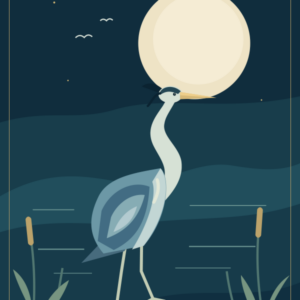
Moonlit Reeds - Geometric Wading Bird Printable Art
Our example uses the included 4000 × 6000 pixel files: a 2:3 ratio that fits 8 × 12 inches without cropping.
One original AI-assisted design in PNG, JPEG and SVG. Digital download; personal use. No physical print or frame.
View files and license · $4.95